External & Third-Party Tools
Introduction
Brevian captures insights from meetings, transcripts, and knowledge sources. By integrating external and third-party tools, those insights can be shared and used directly in the tools where sales teams already collaborate.
By integrating external tools, Brevian can:
- Automatically join scheduled meetings to capture insights
- Generate meeting summaries and share them with internal teams
- Send follow-up emails to external stakeholders after meetings
- Allow teams to interact with Brevian agents directly in messaging tools
NOTE: To view step-by-step instructions for integrating external and third-party tools, see Integrations
What tools does Brevian support?
Brevian supports integration with the following tools:
- Gmail
- Slack
- Google Calendar
- Outlook Calendar
Why should I integrate Gmail with Brevian?
Integrating Gmail allows you to send Brevian-generated emails directly from your own email address. Emails are created in the Brevian app but appear to recipients as if they were sent from your Gmail account. This workflow allows you to quickly share meeting insights and follow up with stakeholders directly from the Brevian app, without switching over to Gmail.
NOTE: Brevian doesn't read or analyze your emails. Gmail integration is only used to send emails generated within the Brevian app.
NOTE: If Gmail isn't connected, emails can still be sent; however, the sender will appear as
[email protected], and not your Gmail account.
With Gmail connected, Brevian can:
- Share meeting summaries via email
- Send follow-up emails
Share meeting summaries
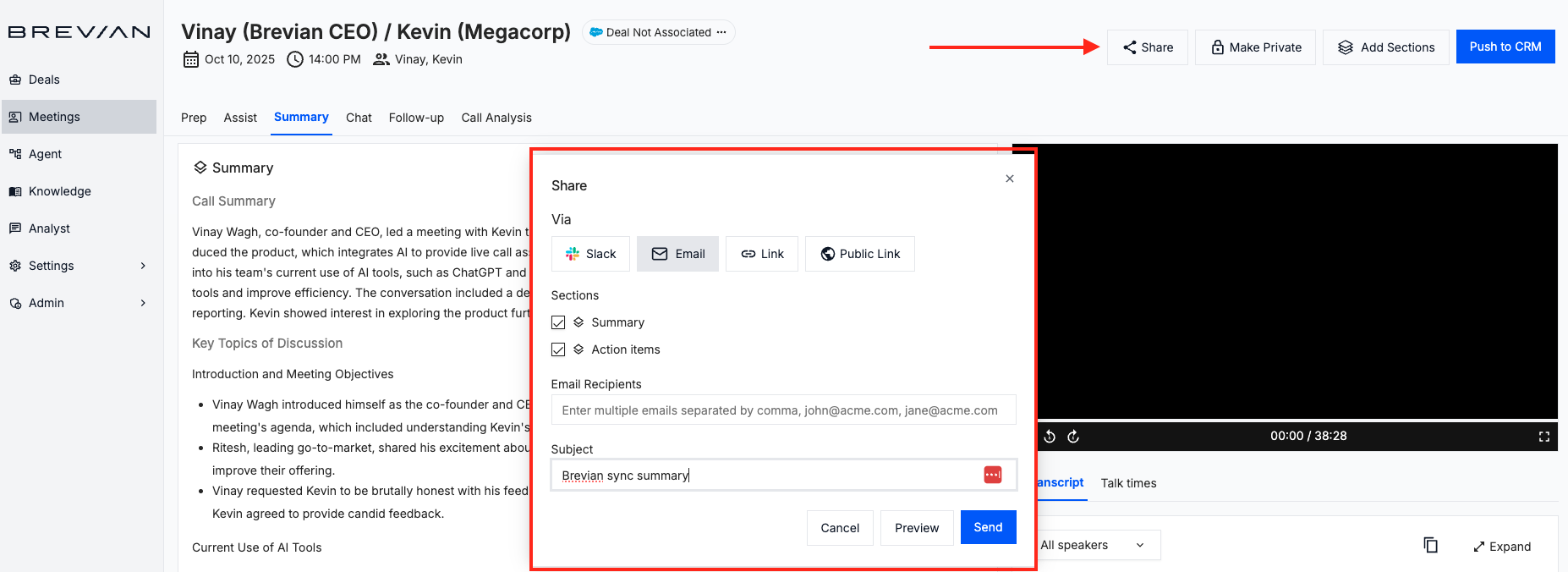
After a meeting ends, Brevian automatically generates a meeting summary. You can quickly send this summary to meeting participants or external stakeholders by email. Before sending, you can choose which sections of the summary to include and edit the subject line.
Select Share, and then follow the on-screen prompts:
Send follow-up emails
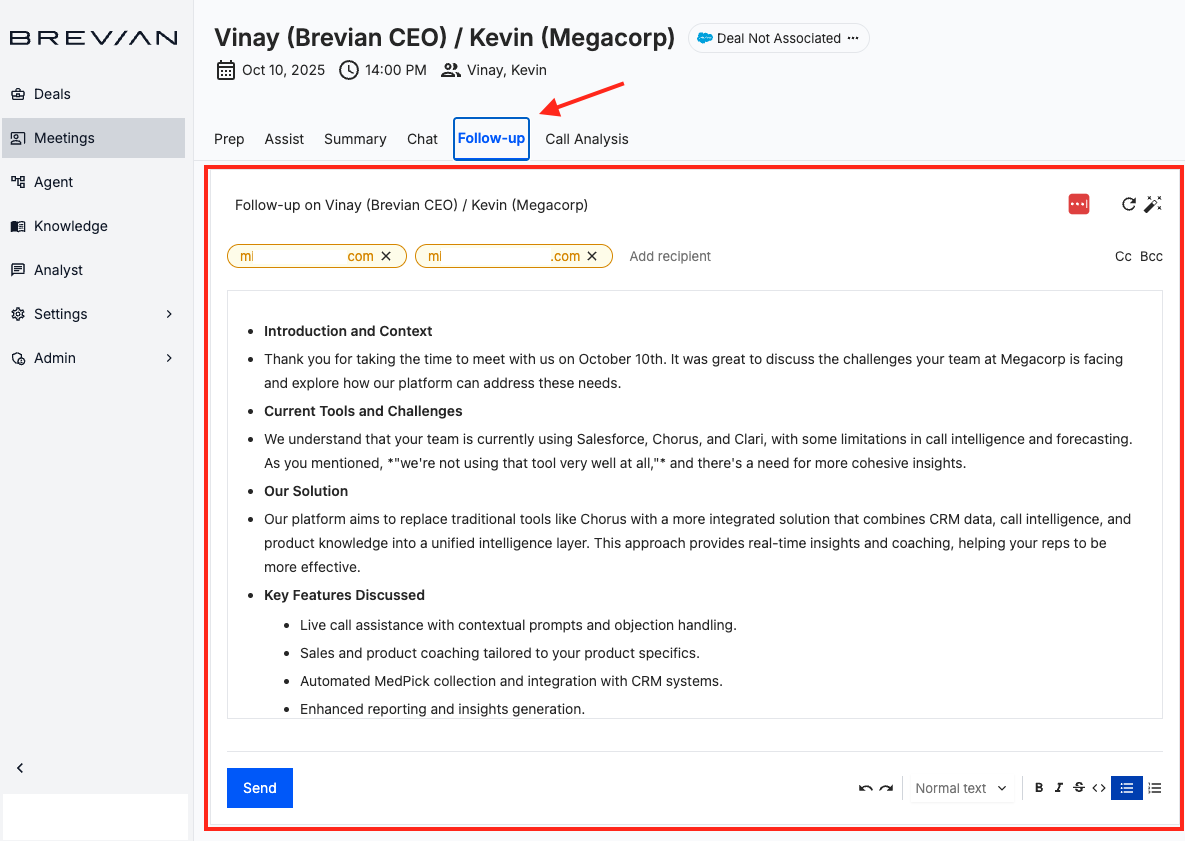
Brevian can also generate a follow-up email based on what was discussed during the meeting. You can review and edit the suggested email before sending it to participants or stakeholders.
Review an auto-generated follow-up email:
Why should I integrate Slack with Brevian?
Slack integration allows teams to interact with Brevian directly inside their messaging environment. Instead of switching between tools, users can access meeting insights and ask questions through Slack.
With Slack connected, Brevian can:
- Send meeting summaries to Slack
- Allow users to interact with Brevian agents through a chatbot in Slack
Send meeting summaries
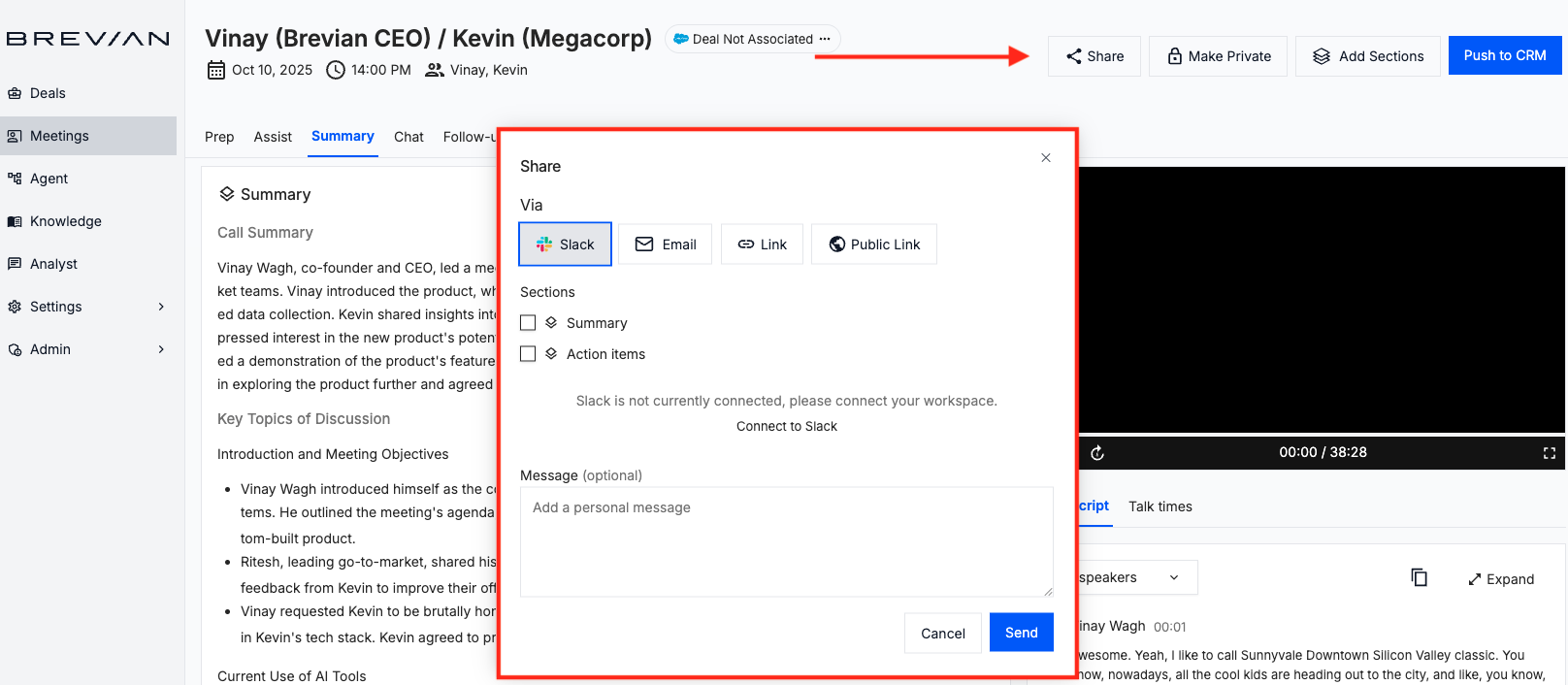
After a meeting ends, Brevian automatically generates a meeting summary. When Slack is integrated, these summaries can be shared directly with teammates or channels in Slack. This allows internal teams to quickly review key discussion points, action items, and customer insights without opening the Brevian app.
Select Share, and then follow the on-screen prompts:
Interact with Brevian through a Slack chatbot
Slack integration also allows users to interact with Brevian’s knowledge agents directly from Slack.
Users can ask questions about:
- Products and features
- Customer conversations
- Internal documentation
- Previous meetings or deal context
Brevian responds with answers based on your organization’s integrated knowledge sources and meeting insights. This capability makes it easier for teams to quickly find information without searching through documentation or switching tools.
Why should I integrate my calendar with Brevian?
Connecting your Google Calendar or Outlook Calendar enables Brevian to automatically detect upcoming meetings and generate meeting intelligence.
Once connected, Brevian can join scheduled meetings and generate:
- Meeting preparation briefs
- Meeting summaries
- Call analysis
- Follow-up recommendations
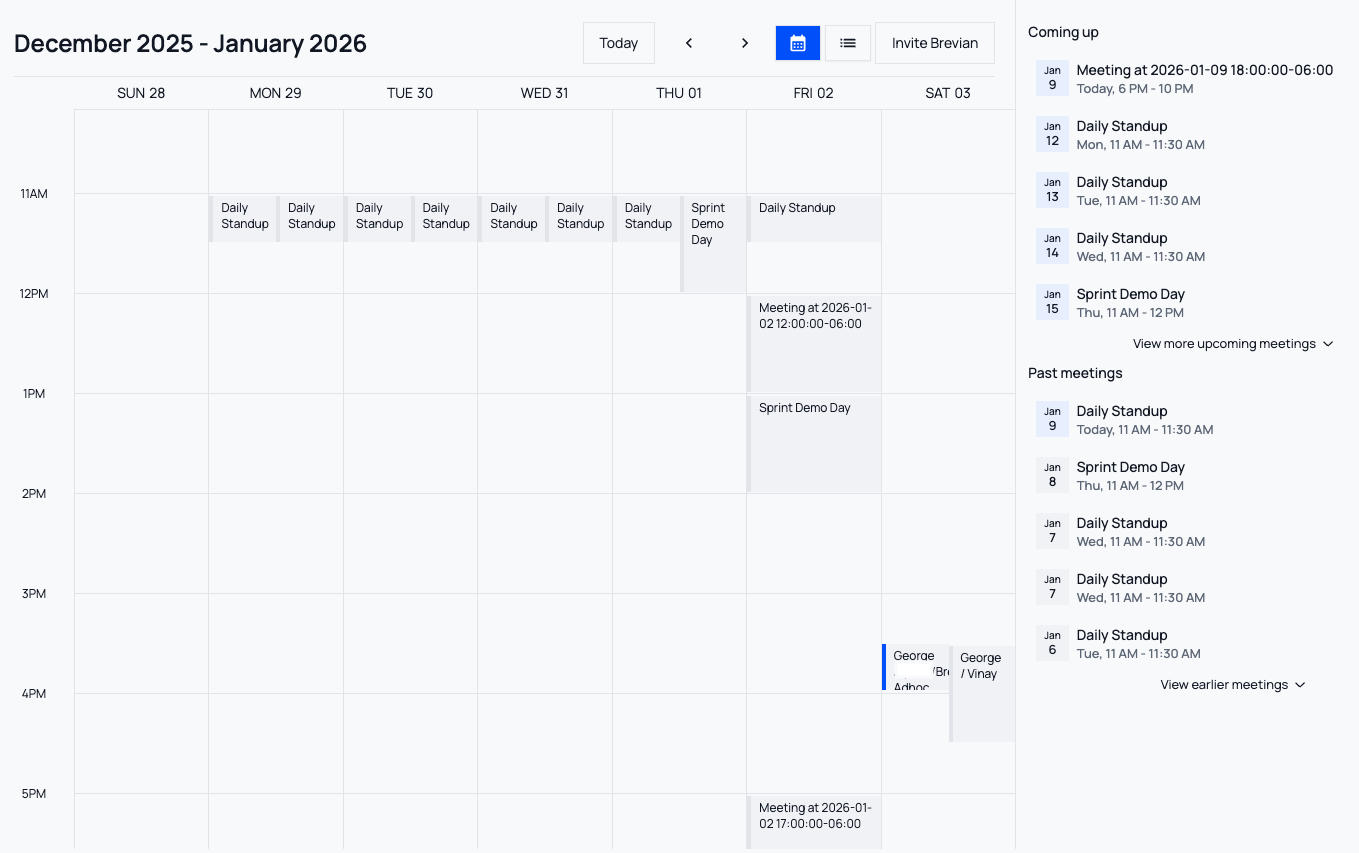
Additionally, meetings will be displayed in the Brevian app, allowing you to quickly scan for upcoming meetings. The Meetings page displays meetings in two views, calendar and table views.
Meetings in calendar view:
Meetings in table view:
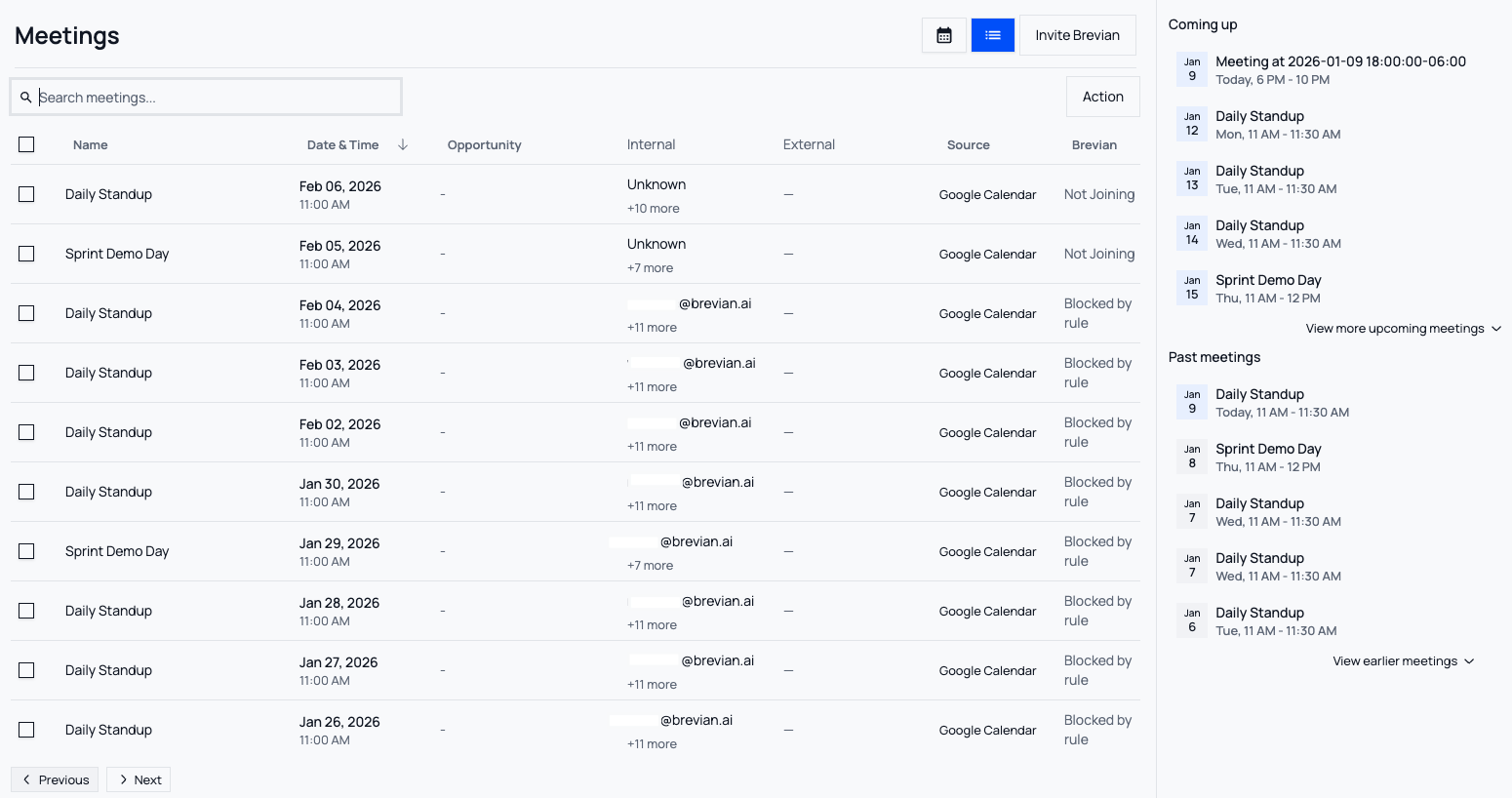
Brevian syncs calendar events from the previous 12 months and up to 3 months into the future.
For Google Calendar, the following events aren't displayed in the Brevian app:
- Task
- Out of office
- Focus time
- Working location
- Appointment schedule
What information can Brevian access from my calendar?
When you connect your calendar, Brevian uses your calendar information to identify meetings and participants, including:
- Calendar event details
- Meeting schedules
- Meeting participants
- Basic Google or Microsoft profile information (such as your name and email)
This information allows Brevian to join meetings and associate meeting insights with the correct contacts.